Reduce missed checks
Automated data collection helps reduce reliance on manual readings.
Smart TMV temperature monitoring
TMV Monitor helps facilities teams, hotels, hospitals and installers keep visibility of thermostatic mixing valve temperatures, device status and historical trends from a secure online dashboard.

Why invest?
Manual log sheets can be missed, delayed or difficult to review during audits. TMV Monitor gives your team a live view of every connected device and creates a digital record that can support maintenance, investigation and compliance workflows.
Each device is designed to be quick to deploy. Once connected over site Wi‑Fi or a single PoE network cable, it begins reporting hot, cold and mixed outlet temperatures to the online dashboard with minimal setup.
Automated data collection helps reduce reliance on manual readings.
Live status and alerts help teams identify temperature or offline issues sooner.
See device readings, trends and history from one dashboard.
Each customer can run on a separate AWS server and dedicated dashboard URL.
Ready to deploy
Monitor cold in, hot in and mixer out temperatures for each TMV point.
Device setup is kept minimal so installation teams can get online quickly.
Hosted on AWS with options for ongoing server management and support.
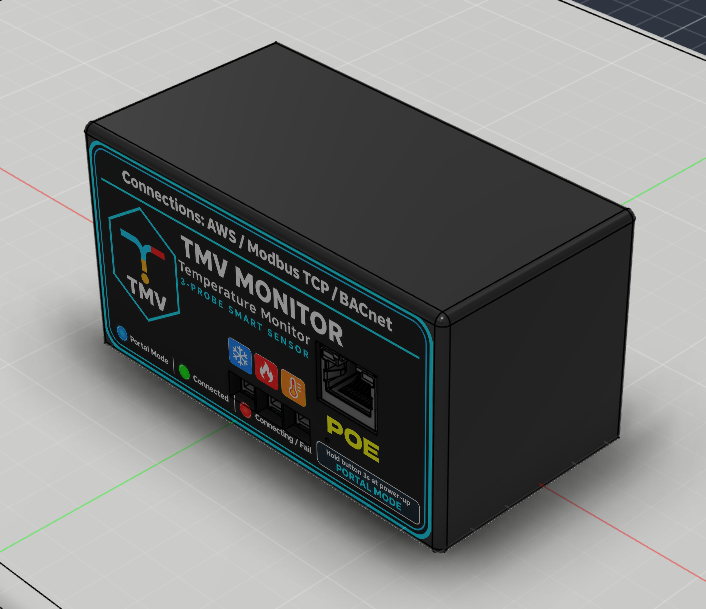
New · PoE TMV Monitor
The PoE TMV Monitor takes its power and network from a single Ethernet cable plugged into a Power over Ethernet switch. No plug sockets near the valve, no Wi‑Fi coverage to worry about, and a wired, reliable link from every TMV point.
The same three-probe unit – cold in, hot in and mixed out – can report to our AWS-hosted dashboard, be read directly by your BMS over Modbus TCP, or appear as BACnet points through the TMV BACnet Server.
Option 1
Readings are sent securely to your own AWS-hosted dashboard for live views, history graphs, alerts and reports – reachable from anywhere.
Option 2
Each monitor is a Modbus TCP device on your network. Your BMS, PLC or SCADA system reads the temperature registers directly – no cloud required.
Option 3
The TMV BACnet Server collects readings from every monitor and presents them to building management systems such as Trend as BACnet points.
How it connects
Every PoE TMV Monitor plugs into a PoE switch. From there, data can go out to the cloud, straight to a Modbus TCP client, or through the TMV BACnet Server to your BMS.
BACnet explained
BACnet is the common language most building management systems use to talk to plant and sensors. Rather than asking your BMS contractor to integrate each monitor individually, the TMV BACnet Server does the translation for you.
Two network modes
The BACnet Server hands out IP addresses to every TMV Monitor on the switch. Ideal for a dedicated, stand-alone TMV network: plug the monitors in and they are found automatically – no IT configuration needed.
Each monitor and the BACnet Server are given fixed addresses. Ideal when joining an existing site network where IT manages the IP plan, or where every device must keep a known, documented address.
Dashboard
The dashboard gives facilities teams a practical view of temperature data, online/offline state, Wi-Fi signal, admin tools, graphs and reporting windows.

Service & support
We do not just supply the device and leave you on your own. We can support the setup process, help configure dashboards, check MQTT communication and assist with ongoing operation.
Contracts can include a yearly subscription for AWS server management, system health checks, dashboard updates, backups and general support. This gives companies a managed route without needing in-house cloud expertise.
Client access
Each client dashboard opens in its own secure area. Authentication is handled by the dashboard itself.
Start a conversation
Contact us to discuss your building, number of TMV points, dashboard requirements, reporting windows and support options.


